


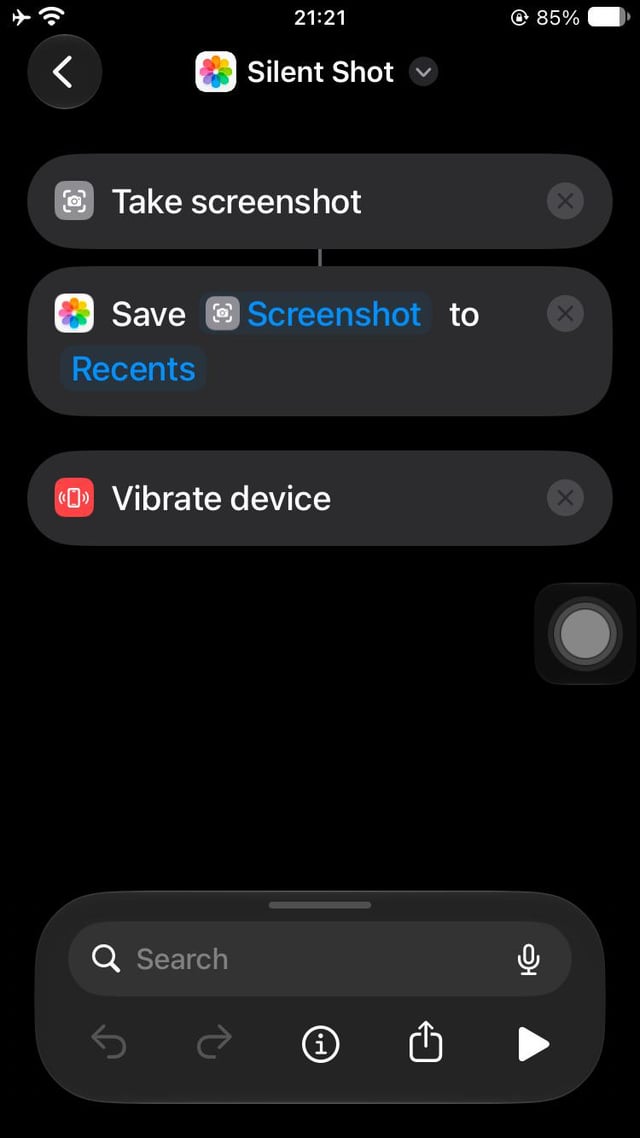

Featured image: Image via Reddit r/iphone
Tip: Turn Off The Screenshot Sound Forever – “Silent Shot Tutorial”
If you’re tired of muting your iPhone every time you take a screenshot, a new method shared on Reddit offers a permanent solution. By leveraging the native Shortcuts app, users can create a custom shortcut that captures screenshots without triggering the default camera shutter sound.
The process involves opening the Shortcuts app, selecting the “take screenshot” and “save image” actions in sequence. While the “vibrate device” action is optional, it can be included for tactile feedback. Once configured, the shortcut is assigned to either the Backtap or Action Button settings. Activating this shortcut via these hardware features allows users to take silent screenshots without muting their phone.
Users who adopt this method report no longer needing to silence their devices for routine screenshots. However, there are trade-offs: the usual preview of the captured image does not appear in the corner of the screen, and a notification banner may briefly appear when taking multiple screenshots in quick succession. To address this, users can either swipe the banner away or wait 20 seconds between screenshots to reset the timer and avoid the notification entirely.
Pros and Cons
- Pros: Eliminates the need to mute the phone for screenshots; customizable shortcut with optional vibration feedback.
- Cons: No image preview by default; potential notification banners when taking rapid screenshots.
FAQ
How does the shortcut work?
The shortcut uses the “take screenshot” and “save image” actions within the Shortcuts app. Assigning it to the Backtap or Action Button allows users to trigger it without activating the default screenshot sound.
What are the downsides of this method?
The image preview typically shown in the corner of the screen is absent by default. Additionally, a notification banner may appear when taking multiple screenshots quickly, though this can be mitigated by waiting 20 seconds between captures.
Can the notification banner be avoided entirely?
Yes, by either swiping the banner away immediately or waiting 20 seconds between screenshots to reset the timer and prevent the banner from appearing.
Source Attribution
This tip was originally shared by user /u/GGPlatino on the r/iphone subreddit. For more details, visit the original post.
Source: Reddit r/iphone