



Intel’s 13th Gen Raptor Lake mobile CPUs will soon make their way to laptops in 2023. We already know that the performance on these new CPUs is significantly faster, especially the higher-end HX-series. We don’t say it often, but these 2023 mobile chips will get you performance gains of up to 70-80% on the highest-end models. With new mobile CPUs from intel, we will look forward to drowning prices on 12th Gen Alder Lake laptops in 2023. After almost a year, here is our long-term review of the Alder Lake 12th-gen Core i7-12700H. We will compare it with the rumored equivalent 13th-gen Raptor Lake i7-13700H.
Intel’s new Hybrid Architecture:
In terms of hybrid architectures, Alder Lake was Intel’s first serious step forward. Intel achieved Enhanced performance and efficiency by combining a high-performance CPU architecture (P-Cores) with a smaller and more efficient core architecture (E-Cores). The dual-arch design works well on desktop machines. Although achieving similar results in a smaller laptop is challenging, the results are impressive. FYI, the full-blown desktop level 13th Generation Raptor Lake CPUs work on the same dual-arch and support the same LGA-1700 socket design. Despite nearly the same arch, the performance boost is significant. Note that the mobile version of these processors uses the BGA-1744 socket on both CPUs.
What is the Intel Alder Lake 12700H made of:
The Intel Alder Lake 12700H features 6P cores and 8E cores. It makes for a total of 20 processor threads, 24MB of L3 cache, and 96 execution units. There is a base clock speed of 2.3 GHz and a boost speed of 4.7 GHz for the P-cores, and a base speed of 1.7 GHz and a boost speed of 3.5 GHz for the E-cores. This chip has a default TDP of 45W. There are mode settings available from many laptop OEMs that allow for higher long-term power limits than what is specified by Intel.
How does the arch compare to Intel Raptor Lake 13700H on Paper?
According to leaks, the 13th Gen Intel Raptor Lake laptop CPU will have 14 cores. Once again, we are looking at 6(P-Cores) and 8(E-Cores). With Raptor Cove CPU architecture, we’ll see faster clock speeds up to 5.0 GHz. Intel’s Raptor Lake-HX lineup offers up to 24 cores, so those who want more cores can wait.
Alder Lake and Raptor Lake H-Series and HX-Series laptops aim at high-performance users. Alder Lake H series can be paired with either DDR4 or DDR5 RAM, but we are not sure about Raptor Lake.
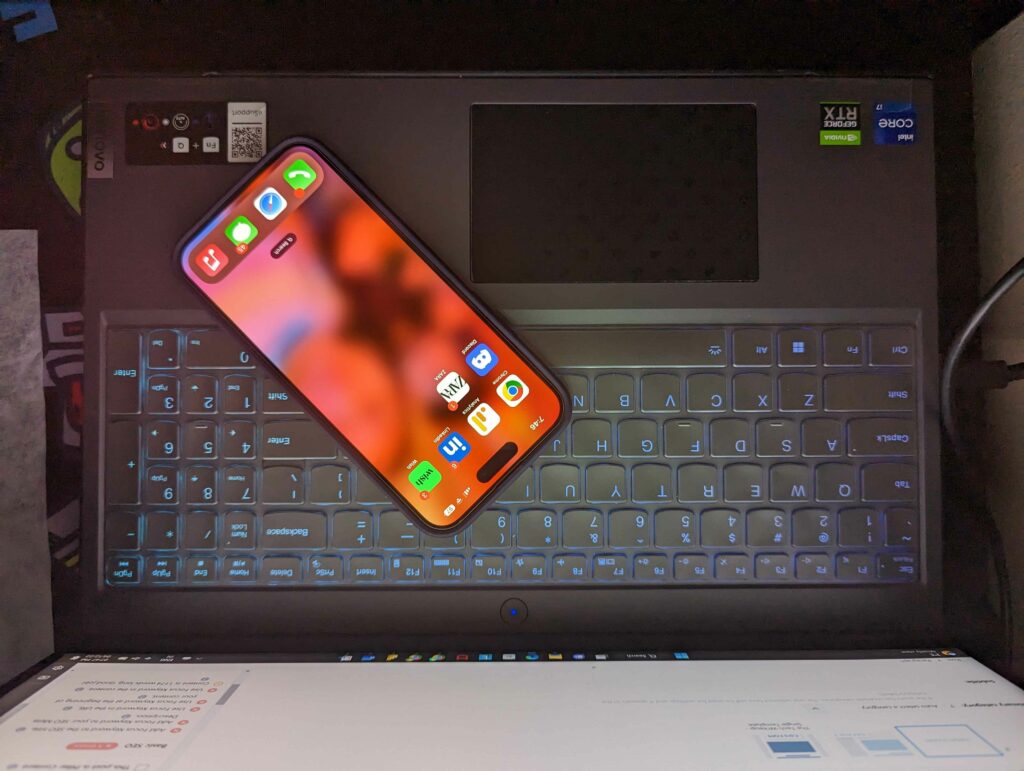
Earlier this year, we reviewed the Gigabyte AORUS 5 SE4-73US513SH Gaming Notebook and paired it with i7-12700H and DDR4 RAM. Now, we have the Lenovo Legion 5 Pro with DDR5 RAM in the studio to compare against the DDR4 RAM version. The test results on this review come from the DDR5-4800 RAM. As a matter of fact, both laptops we reviewed equip an RTX 3070 GPU with 140W TGP. Internal GPUs are based on Intel’s Xe architecture. Additionally, Legion 5 Pro has a high refresh 1440p display in comparison to the FHD display on AORUS 5 SE4.
We’ll be testing both GPUs in a separate review. We will be exploring the CPU performance later in our benchmarks.
Application Benchmarks
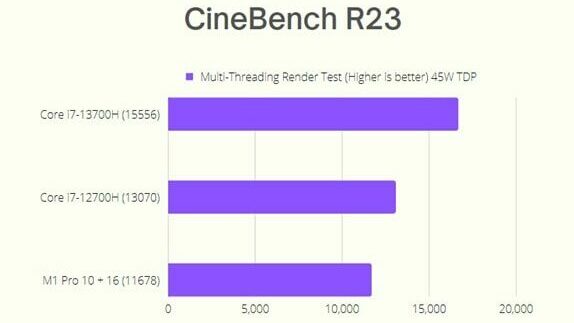
Cinebench 23 Multi-Threaded
Our favorite benchmarks are Cinebench 23 and PCMark 10. In our testing, the Alder Lake Core i7-12700H performed better than our MacBook Pro 16 inches with M1 Pro (10+16) processor. The test results are at 45W. These may not be the fastest scores, considering the HX series in MSI laptops. In our hands-on tests, this is the fastest mobile processor that hits the sweetest price spot in the loyal consumer market.
If we believe in rumors, there is about a 21.5% boost on the upcoming Raptor Lake i7-13700H mobile processor. On the other hand, the i7-12700H is 10.6% faster than the M1 Pro (10+16) processor. It is not best to compare the ARM chip and the traditional x86 Arch, but it makes the i7-12700H one of the best x86 processors in performance per watt usage.
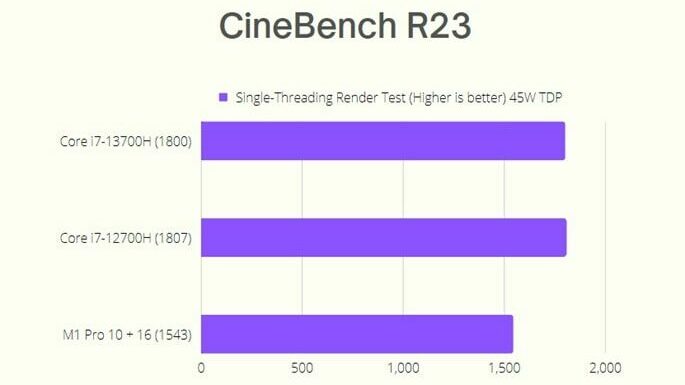
Cinebench 23 Single-Threaded
It is interesting to see Intel smashing the Cinebench scores for single-threaded performance. Thanks to 6 Performance-Cores running at 4.7GHz, it makes Apple’s M1 Pro (10 + 16) look sad. Intel wins over Apple by over 18%. We are not considering the M1 Max models, as the price-to-value ratio is not there yet. You can purchase the i7-12700H laptops in the consumer market for 1500 CAD or even less during the holiday season. When writing this review, the Asus Zephyrus M16 2022 costs 1499 CAD at Amazon and the Gigabyte AORUS 1350 CAD on CandaComputers. The M1 Pro MacBook Pro 16 (10+16) is priced at CAD 3,399.00 for 1TB of internal storage. The M1 Pro is more efficient as it achieves a lower TDP due to its architecture.
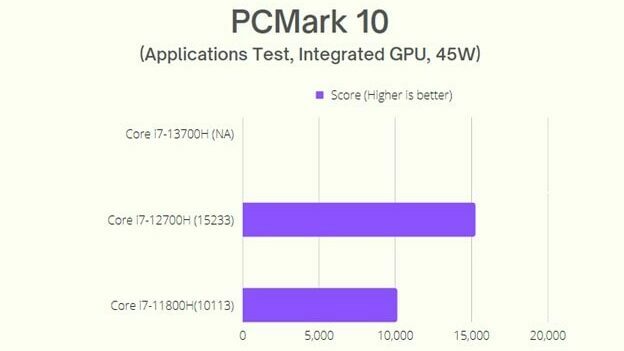
PCMark 10 Benchmarks
Based on its excellent single-threaded performance, the Core i7-12700H can outperform other mobile processors on the PCMark Applications test, which measures Microsoft Office performance. The performance gains are 33% in comparison to our test machine on an Asus Zenbook from last year.
Blender CPU Rendering
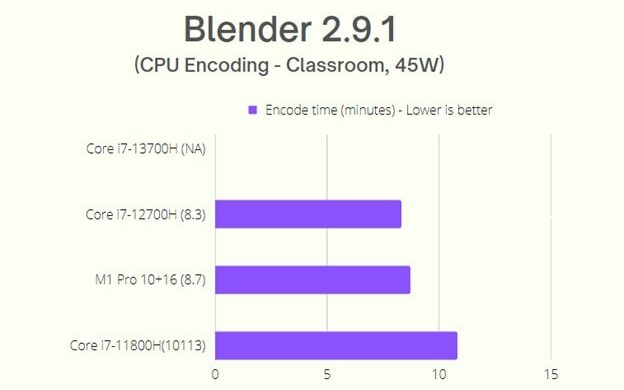
Blender CPU Rendering performs well on Core i7-12700H at 45W. It is shy by 4% of the M1 Pro (10 +16) and is 23% faster than Core i7-11800H.
Code Compile
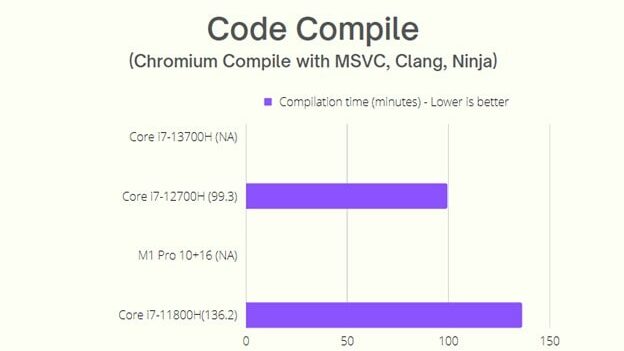
The difference is massive for Code compilation between DDR5 and DDR4 memory. Alder Lake i7-12700H performs 35% better than the i7-11800H processor on our Zenbook. The generation gap is massive, and we believe it to be more with the i7-13700H.
7-ZIP Compression
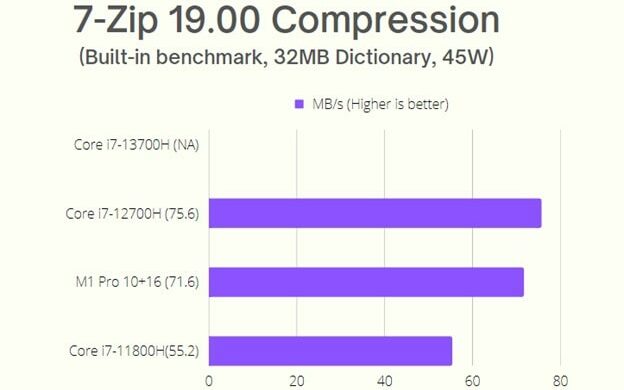
The Powerful 4.7GHz Performance cores on the Alder Lake CPU help in this benchmark. The performance is about 27 percent more than the i7- 11800H. It is astonishing to see the Intel chip beating the M1 Pro by 5.3 percent. The performance gains come at the cost of low efficiency in comparison to the M1 Pro.
7-ZIP Decompression
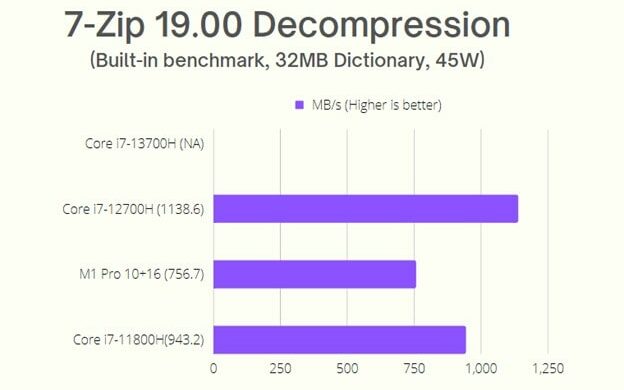
Generally, we see Ryzen CPUs performing the best in this case. We did not have a Ryzen CPU for performing this test against the i7-12700H CPU. Some online results show that the Core i7-12700H performs slightly better than Ryzen 9 5900HX. Alder Lake i7-12700H is 17.1 percent faster than the i7-11800H and 33.5 percent faster than the M1 Pro.
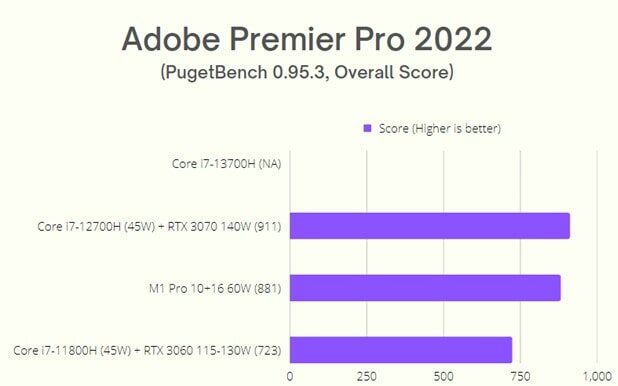
Adobe Premier Pro 2022 – Overall Score
Last year when we got my first M1 Pro-powered MacBook, all we cared about was Adobe Premier Pro performance. Now we have the Lenovo Legion 5i Pro with Intel i7-12700H and RTX 3070 GPU. We admire every bit of performance here. The performance gain is 3.27% over the Apple M1 Pro and 21% over the i7-11800H.
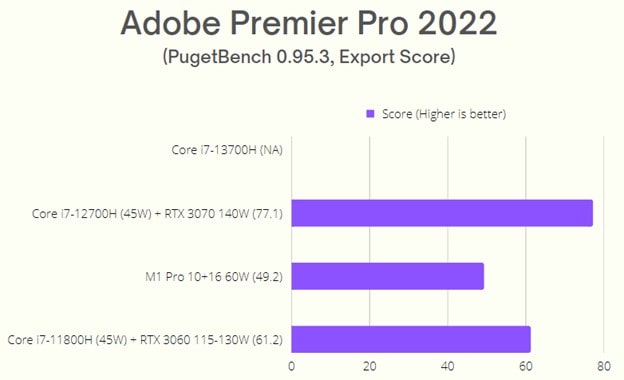
Adobe Premier Pro 2022 – Export Score
The overall score is better due to massive improvements in the export scores. Our configuration scores 21% faster than the last generation i7-11800H and 36% faster than the M1 Pro (10+16) on MacBook Pro.
Adobe Premier Pro 2022 – Effects Score
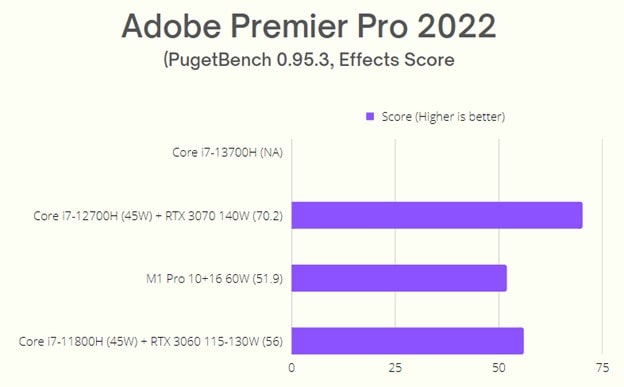
The Effects score see’s 21% performance uplift in comparison to i7-11800H using RTX 3060 graphics and 26% faster than the M1 Pro MacBook Pro 16.
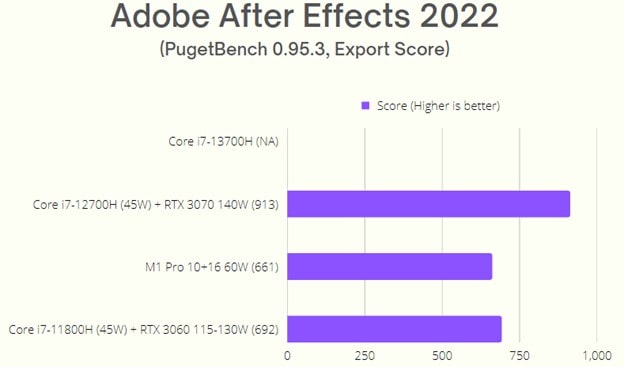
Adobe After Effects 2022
Adobe After Effects is significantly faster too. The results are 23% more speed when compared to i7-11800H and 27% more when compared to M1 Pro (10+16).
Power Consumption
We did not want to compare this with the extremely efficient Apple M1 Pro, but we want you to see the results. The Alder Lake Core i7- 12700H behaves similarly to the i7-11800H and is widely different from the ARM-based M1 Pro chips. The i7-12700H is faster, but it draws more power for those beefier applications taking advantage of 75W. At 45W, the performance for those multi-cores is widely the same for the i7-12700H and the M1 Pro Arm chip. The 10nm SuperFin process on the Alder Lake is not as efficient at 65W and 75W.
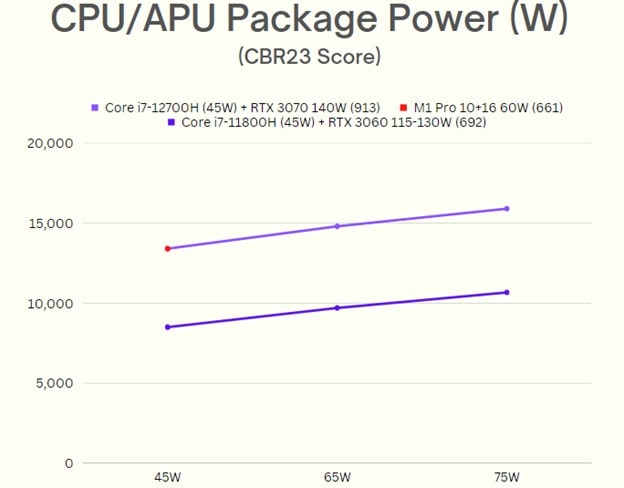
The default boost power on the i7-12700H gets a boost on the latest Alder Lake. For tests like 7-Zip compression, the M1 Pro chip can keep up with the Intel chips at half the watt usage.
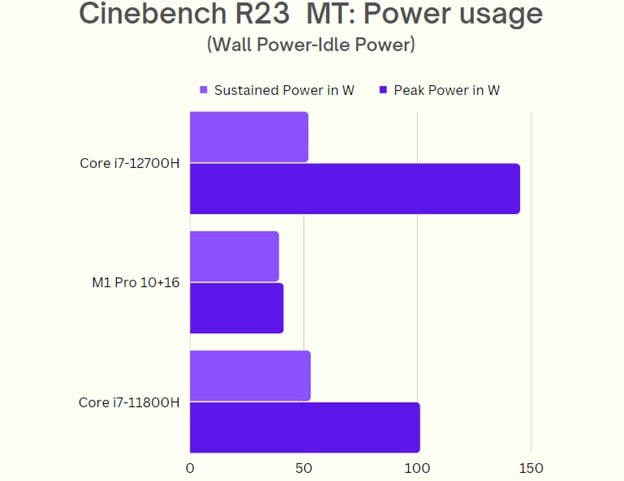
You will see the laptops with i7-12700H having a more power drops in day-to-day life in comparisons to MacBooks. We always say that both machines are different and server’s different purpose. The power consumption will not matter to the gamers. For the remaining audience, Intel has the U series of processors with better power efficiency.
What do we learn about the i7-12700H in comparison to the upcoming i7-13700H?
We do not have much information on the 13th Generation Raptor Lake Mobile CPUs. Going with the trends, we can see more power consumption with the upcoming mobile processors from Intel. It means that companies may need better cooling solutions and a redesigned chessy.
In return, we will see a gain in performance. Do not forget that the upcoming Raptor Lake CPUs may pair with RTX 4080 or 4090TI GPUs that are more power efficient. It does not happen often that we get new CPUs and GPUs together.
A new generation of CPUs and GPUs should be available to consumers by April or June 2023. It would be beneficial for you to wait for the new releases as the price of the 30-Series RTX laptops will drop significantly at that time. Who does not want to buy a 1000$ RTX 3060 or 3070 Laptop? It is any day better than the super expensive new generation laptops.
What did we learn today from this Article?
Despite Alder Lake’s power, it struggles in single-thread and burst workloads. The Raptor Lake CPUs are not out yet, but we suspect a similar behavior.
If you are not concerned about energy efficiency, shop for laptops with the i7-12700H CPU this holiday season. Otherwise, wait for the settling market in 2023, and buy the laptops with i7-12700H CPU when the 13th Generation Raptor Lake mobile CPUs are available for the consumer market.
We may see Apple’s M2 Pro chip in the coming year too. Apple’s offering is more convincing for non-gamers and productivity heroes. For gamers, i7-12700H is not a slouch, and it still holds itself to the competition after almost one year of its release date.
About improving on Thermals on i7-12700H Laptop
Unlike modern desktop CPUs, it is hard to improve on thermals on laptops. We did not have a spare laptop to open and experiment with for the ongoing flow of this article. But there are many other ways of improving thermals on our laptops these days.
A few of them are as follows:
- In quiet mode, our Legion 5 Pro dropped frames. Before, we could play God of War at 100 frames per second or more. There was a drop in performance to 40-50 frames per second. At this point, the GPU seems to consume 45-50 watts of power. Well, sustained thermals mean better usage per watt, and we must see better performance and low drops in frames. Folks, this is not the case here, and we recommend this only if you are traveling and you know there are not as many stops to charge your laptop.
- Use Liquid metal instead of the pre-applied thermal paste or the expensive PTM7950 thermal pad. We did not try it, but we talked to a few people on Reddit to confirm the results. The drops in thermal temperatures are substantial, but we do not have official numbers from our tests.
- Use a thermal pad and CPU Cooler stands. It will help you sustain temperatures for an extended period.
- Avoid using your laptops on your laps. The space between laptop pads on the base and the ventilation on the back allows active airflow to cool your CPU.
- Modify the laptop so it can use liquid cooling. You would be better off buying a PC instead of a laptop if you want liquid cooling.
- Avoid overclocking and pushing your CPUs with games on their highest settings. Maintained thermals will give you a better overall gaming experience rather than playing in the highest settings.
Our Legion 5i Pro has a better Chessy than most of the competition. It allows for better cooling on our i7-12700H CPU. In the past, I had some experience with a crazy hot Asus Zephyrus M16 laptop with the same CPU and RTX 3060. The laptop goes crazy hot to the point where you cannot touch the keyboard anymore while playing games. The thermals on our unit of i7-12700H are good, and while there is room for improvement, I will leave it to some experiment blog in the future. As of now, let us know what your experience has been so far with an i7-12700H laptop. Feel free to drop some comments below.
Also, do not forget to read our following Articles:
- OnePlus 10T Plastic body frame breaks in half – Deceptive in 2022
- Is GTA 6 coming out soon? We speculated on the 2024 hype!
- How to enable Windows 11 Taskbar on Windows 10?
- How to enable Nearby Sharing on Windows 11 – AirDrop alternative for Windows users!
- Android 13 Update List Tracker – Amazing 2022 Guide
- How to clear iPhone RAM? Amazing 2022 Guide